









How-to research series: 1. Searching for published evidence
Dr Juliet Rayment Qualitative Research Consultant and Honorary Research Fellow, Centre for Maternal and Child Health Research, City, University of London

Small qualitative studies, done right, can tell you a lot, and everything in this series will be ‘social distancing friendly’: I’ll be explaining how you can hear people’s stories and learn from them without being face-to-face.
With so many midwives returning to practice at short notice at the moment, many will want to remind themselves of the evidence on best practices. Others might be working in services that are wondering what service users and patients need in this new world.
This series will show you how to ask the questions you want to ask to the right people in the most useful way. Time is short so we’ll keep it simple.
The first two blogs in the series will be all about looking for the evidence that has already been published. This month I’ll give you some tips on searching for articles and next month I’ll show you how to get your hands on them and decide if they’re worth reading. I won’t be showing you how to do systematic searches, as you would for a systematic review. There’s a handy guide to systematic searching here, if you’d like to find out more. Instead, this blog is about basic searching strategies that are accessible to everyone.
Why bother?
Information is powerful. Perhaps you want to know more about wearing PPE in the community to protect yourself against Covid-19. Or maybe you are supporting a woman to make a decision about her care and you’d like to know more about her options. Your service needs to change its pathways for place of birth in response to the COVID pandemic and you want to make sure what you are considering offering will still provide the safest care.
Let’s take place of birth as an example. Your service has chosen to close the midwifery unit and is asking all women to birth on the obstetric unit. You would like to understand the risks and benefits of this proposal, especially for low risk women without symptoms of Covid-19. You have a hunch that asking low-risk women to birth on an obstetric unit gives them additional risks beyond Covid infection, but your colleagues aren’t convinced. Time to find some evidence.
Simply Googling is inevitably overwhelming. Searching ‘place of birth’ gives you 3,400,000,000 hits. ‘Safety of place of birth’ a mere 631,000,000.
Where else can we get easily accessible, rigorous information?
Using Google Scholar
For a long time, the only way to search for research articles was through academic databases: PubMed, Medline and the like. You needed a university subscription to get very far with those. But now there’s Google Scholar. Google Scholar is Google but for research evidence and you can find it at www.scholar.google.co.uk.
Google scholar only brings up academic journal articles and reports although you can also ask it to search case law.
-
Choose your words carefully
The first thing to get right are the words you use to search. Google is clever enough that if you type in ‘Place of birth’ you are likely to get lots of articles that are about place of birth, but you will also get articles that are about places, or births that have nothing to do with what you need. There are three helpful tools that you can use to focus down your search results and you can use all of these in the main search box:
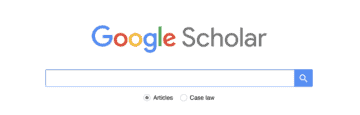
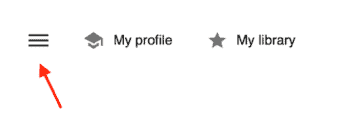
Or the ‘Advanced search’ which you can find by clicking in the very top left corner, here:
Which will bring up a box:
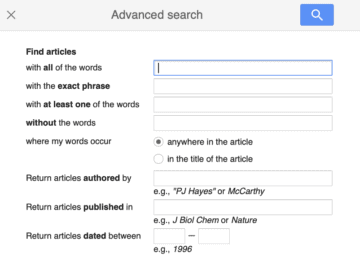
Here are three most useful tools
- Exact phrases: in the main search box, put a phrase in “quotation marks” and it will search for these exact words in the text or title of an article. In the Advanced Search just put your search terms in the second field down.
- AND: using AND, for example by typing ‘“place of birth” AND choice’ will make sure both of these words or phrases are in an article. In the Advanced Search box, the top field will do this for you.
- If you find that your searches keep coming up with the same irrelevant topic, you can use ‘–’ like a negative sign, in front of a word (with no space) to explicitly exclude certain words from your searches. The Advanced Search box for this is labelled ‘without the words’.
2. Make sure it’s still relevant
‘Any time’ on the left hand side of the screen or in the Advanced Search box allows you to select when you’d like your results to go back to. The last four or five years ago will keep it current. Or, alternatively, have a think about any major policy changes around your topic and search from the year they were published using ‘custom range’.
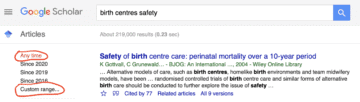
A quick scroll down your search results should show you whether or not your terms are working well enough to get you what you need. If they look promising, great. If not, think of some alternative phrases, eliminate results using the ‘without these words’ tool, or widen your search by deleting the inverted commas.
3. Check what else is out there
The ‘Cited by’ tag tells you how many other articles have referenced this one – the higher the citations, the more popular the article. Remember, though, that it doesn’t tell you anything about its quality (more on that next month).
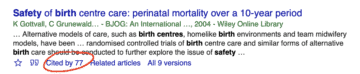
If there’s a particularly relevant article in your list, looking at who else cited it, by clicking on ‘cited by’ can be a good way to find other useful papers.
4. Track down the abstract and full text
Once you’ve identified articles that might be helpful, you need to move out of Google Scholar to get hold of them. For articles that are tagged as ‘Full View’ on the right hand side of the screen, you will only need to click there to get access to the whole thing. Many of the others are also available by clicking on the link to the publisher’s website on the right hand side. Despite a welcome trend towards publishing evidence freely, many publishers will leave you behind a paywall. This can be a frustrating experience if you don’t have a password. Next month, I’ll be talking about alternative (legal!) ways to get hold of full text articles without an institutional subscription.
Online statistics
Published articles aren’t the only evidence that can inform health services. A number of government organisations publish statistics online alongside helpful summaries that can help you get a sense of the bigger picture in which you’re working. The Office of National Statistics (ONS) is an obvious place to start for broader, social statistics. They publish all birth and death rates, including trends in maternal age and ethnicity, average family size, conception rates, fertility rates, stillbirth and so on.
For publicly accessible, health orientated statistics, the Public Health England ‘Fingertips’ data is a fascinating resource of stats on all sorts of health measures that have been already ‘cleaned’ and sorted for you. Their ‘Pregnancy and Birth’ section includes routinely collected data on a wide variety of maternal and child health measures that you can explore by region, and you can even generate charts comparing data to spot relationships between different issues. However, this data is only as good as whatever Trusts and CCGs send to PHE and there are significant gaps.
Next month I’ll be writing all about getting your hands on the articles you’ve found and then deciding if you should be paying attention to them or not. In the meantime, let me know how you’ve been getting on with using Google Scholar and whether it’s giving you what you need. Feedback and suggestions for future posts are very welcome.
Stay well.
Juliet 🙂

You can contact Juliet via:
Website: www.julietrayment.co.uk
Twitter: @julietrayment